
What should you look for when buying a monitor?
When buying a monitor, there are several key factors to consider to ensure you get the best display for your needs. Here’s what you should look for:
1. Purpose & Use Case
- Gaming Monitor:
- Screen size 27 inches 4K resolution
- High refresh rate (240Hz+)
- Low response time (<0.5ms)
- TN or IPS panel
- Adaptive sync (G-Sync (NVIDIA) / FreeSync (AMD))
- sRGB color gamut
- Professional Work (Photo/Video Editing, Design):
- Screen size 24-27 inches 2K or 4K resolution
- Refresh rate 60Hz-120Hz
- IPS panel or Blue Light filter & flicker-free
- Wide color gamut (sRGB, AdobeRGB, DCI-P3)
- General Use & Office Work:
- HD or 2K resolution
- Comfortable size (24–27 inches)
- Refresh rate 60Hz-120Hz
- Flicker-free & low blue light features.
- IPS panel
- Productivity (Multiple Windows, Coding, Trading)
- Ultrawide (21:9 or 32:9) or dual-monitor setup
- High resolution
- Ergonomic stand.
2. Screen Size
- Small (22-24 inches): Good for compact desks, 1080p is fine.
- Medium (25-27 inches): Ideal for most users, 1440p recommended.
- Large (32 inches+): 4K resolution is best to maintain sharpness.
- Ultrawide (34 inches+): Great for multitasking and immersive gaming.

3. Resolution
- 1080p (Full HD, 1920×1080): Budget-friendly, good for general use, gaming, and media consumption.
- 1440p (QHD, 2560×1440): Good balance of quality and performance. Offers more screen real estate and sharper images than 1080p. Ideal for work and gaming.
- 4K (UHD, 3840×2160): Provides incredibly sharp details and is great for professional design work, video editing, and high-end gaming.
- Ultrawide (3440×1440, 5120×1440, etc.): More screen space for productivity.
4. Aspect Ratio:
- 16:9: The standard for most monitors.
- 21:9 (Ultrawide): Great for multitasking, gaming, or cinematic video editing.
- 32:9 (Super Ultrawide): Offers even more horizontal space for multitasking or an immersive gaming experience.
5. Refresh Rate:
- 60Hz-75Hz: Standard for everyday use.
- 120Hz-144Hz: Ideal for gaming, offering smoother motion.
- 240Hz and above: For competitive gaming, where smooth motion and response time are critical.
6. Response Time
- Lower response time (0.5ms-5ms) is essential for gaming, especially fast-paced games. A lower response time helps reduce motion blur.
7. Color Accuracy
- Important for professional creatives like photographers, designers, and video editors. Look for a monitor with good color coverage (sRGB, Adobe RGB, DCI-P3) and factory calibration.
8. Panel Type
- IPS (In-Plane Switching): Offers excellent color accuracy and viewing angles, great for photo/video editing, and professional work.
- TN (Twisted Nematic): Typically cheaper and offers faster response times, but with lower color accuracy and viewing angles. Ideal for competitive gamers.
- VA (Vertical Alignment): Great for contrast ratios and deeper blacks, good for media consumption.
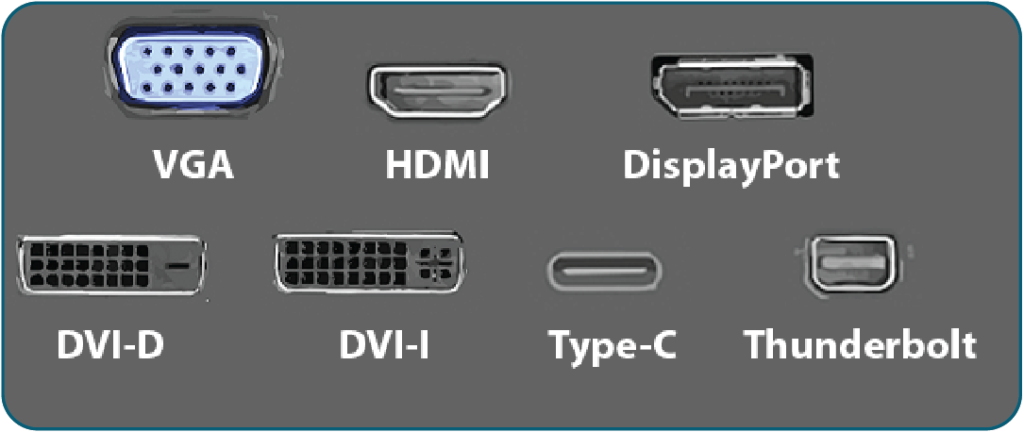
9. Connectivity
- HDMI: Most common for PCs and consoles.
- DisplayPort: Best for high refresh rates & gaming.
- USB-C: Ideal for laptops, sometimes supports charging.
- Thunderbolt: Premium monitors, fast data transfer.
- Built-in USB Hub: Extra convenience for peripherals.
10. Ergonomics and Adjustability
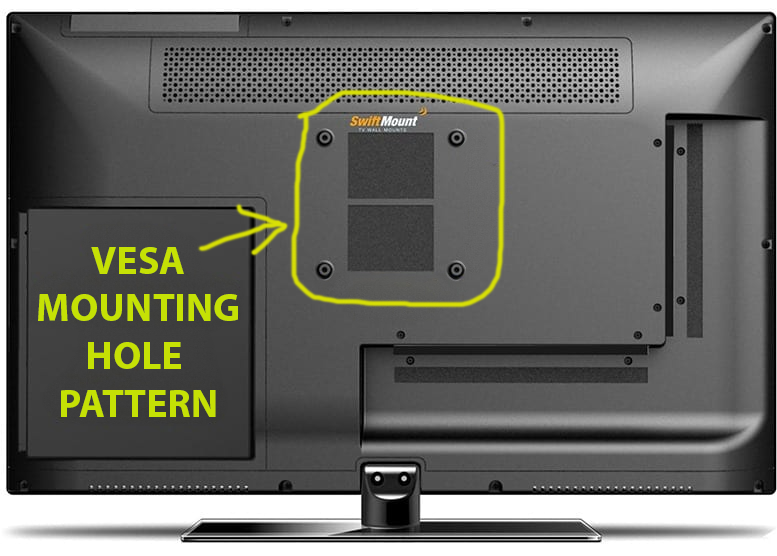
- Look for monitors with height, tilt, swivel, and pivot adjustments for better comfort and viewing angles.
- A VESA (Video Electronics Standards Association) compatible mount can help if you want to set up your monitor on a stand or wall mount.
11. Additional Features
- Adaptive Sync: G-Sync (NVIDIA) / FreeSync (AMD) for smooth gaming.
- HDR (High Dynamic Range): Provides better contrast and color in supported content. (HDR10, Display HDR 400+). Select Start > Settings > System > Display > Advanced display.
- Blue Light Filter & Flicker-Free: For reducing eye strain during extended use.
12. Brand & Warranty
- Top Brands: Dell, LG, ASUS, BenQ, Acer, Samsung, MSI.
- Warranty & Customer Support: Check return policy and coverage.
13. Budget
- Basic (Under $150): 22-24″ 1080p, standard refresh rate.
- Mid-Range ($200-$500): 24-32″, 1440p or 144Hz.
- High-End ($500+): 4K, ultra wide, high refresh rate.