

What Types of AI Images Sell Better and Get Approved in Adobe Stock? | Adobe Stock Niche Research
The goal is to create images that are commercially useful, technically high quality, original, and visually professional.
In this complete tutorial, we will explain what types of AI images can have better commercial potential on Adobe Stock, how to create useful AI stock content, how to avoid common AI mistakes, and how to inspect your image before submission.
1. What Makes an AI Image Valuable on Adobe Stock?
Before creating AI images, understand one important concept:
Beautiful Image ≠ Best-Selling Stock Image
An image can look amazing but have very little commercial value. Stock buyers are usually looking for visuals that solve a specific design, marketing, editorial, or communication need.
Before generating an image, ask yourself:
“Who could use this image, and what could they use it for?”
2. Business and Corporate AI Images
Business and corporate concepts are useful areas to explore because companies, websites, marketing agencies, and publishers need visual content for many different purposes.
3. Technology and Artificial Intelligence

Technology is another important area for stock-content creators.
- Artificial Intelligence
- Machine Learning
- Cloud Computing
- Cybersecurity
- Data Analytics
- Automation
- Robotics
- Digital Transformation
- Software Development
- Internet of Things
4. Healthcare and Wellness

Healthcare and wellness are also useful areas for visual content.
- Doctor consultation
- Telemedicine
- Medical technology
- Healthcare research
- Healthy lifestyle
- Fitness
- Nutrition
- Elderly care
- Digital health
- Wellness
AI-generated healthcare images should be inspected carefully for incorrect anatomy, medical equipment, hands, fingers, facial details and unrealistic environments.
5. Lifestyle and Everyday Life
Lifestyle content can be useful for websites, advertisements, blogs, magazines and social media.
- Family
- Friendship
- Travel
- Home life
- Education
- Shopping
- Fitness
- Cooking
- Parenting
- Senior lifestyle
6. Seasonal and Holiday Content
Seasonal content can be useful because businesses and designers regularly need visuals for upcoming events and campaigns.
7. Cultural and Regional Content
Regional and cultural content can help diversify an AI stock portfolio.
- South Asian lifestyle
- Bengali culture
- Traditional food
- Traditional clothing
- Muslim lifestyle
- Asian business environments
- Local markets
- Regional architecture
- Cultural celebrations
AI can sometimes generate incorrect clothing, architecture, food, religious objects and cultural symbols. Always inspect these details before submission.
8. Backgrounds and Abstract Concepts
Background images can be particularly useful because designers can place their own products, text or logos over them.
- Technology backgrounds
- Business backgrounds
- Luxury backgrounds
- Minimal backgrounds
- Product presentation backgrounds
- Social media backgrounds
- Website hero backgrounds
- 3D abstract backgrounds
9. Product Presentation and Mockup Concepts
AI can also be used to create generic product presentation environments.
- Cosmetic product backgrounds
- Smartphone presentation scenes
- Food packaging scenes
- Luxury product environments
- E-commerce product backgrounds
- Beauty product scenes
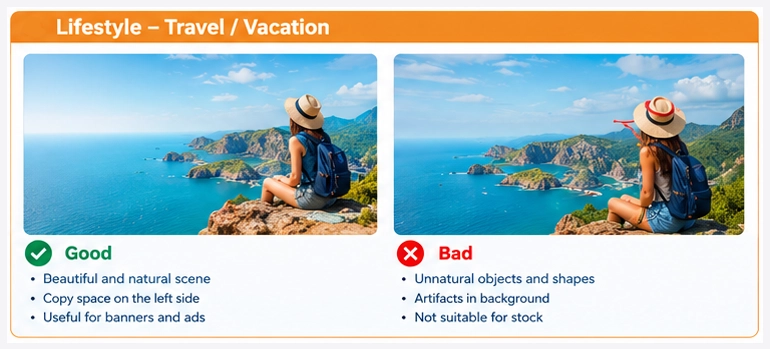
10. Why Copy Space Is Important
Copy space is an intentionally empty area of an image where designers can add text or other graphic elements.
| Composition | Possible Use |
|---|---|
| Subject on the right | Text or headline on the left |
| Subject on the left | Advertisement text on the right |
| Product in center | Minimal product advertisement |
| Large empty background | Website hero section |
11. Vertical and Horizontal Variations
Different buyers need different compositions. Consider creating genuinely useful variations such as:
- Horizontal banner
- Vertical composition
- Square composition
- Close-up
- Wide composition
- Copy space left
- Copy space right
12. The Most Important Part: AI Quality Control
One of the biggest mistakes new AI contributors make is:
Instead, use this workflow:
13. Check the Hands
Hands are one of the most common problem areas in AI-generated images.
- Count the fingers.
- Check finger positions.
- Check finger length.
- Check hand anatomy.
- Inspect hands holding objects.
- Inspect hands touching other people.
14. Check the Face
- Eyes
- Pupils
- Eyebrows
- Teeth
- Ears
- Skin texture
- Hair
- Facial symmetry
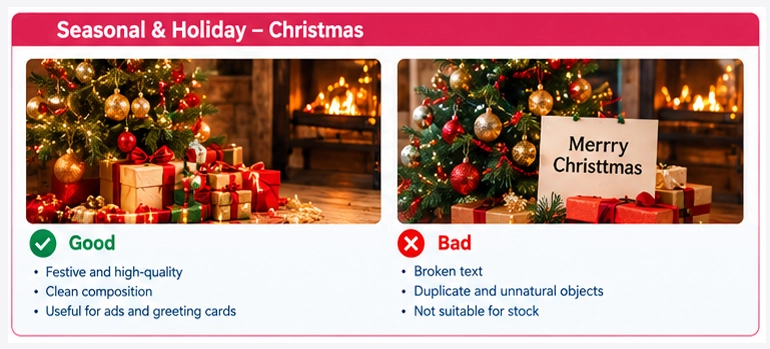
15. Check AI-Generated Text
AI image generators can sometimes produce broken or meaningless text.
- Misspelled words
- Random characters
- Broken letters
- Unreadable typography
- Fake logos
16. Check Objects and Backgrounds
Carefully inspect objects such as:
- Smartphones
- Laptops
- Cameras
- Glasses
- Watches
- Vehicles
- Tools
- Furniture
- Kitchen equipment
Look for duplicated objects, impossible shapes, missing parts, distorted buttons and unnatural reflections.
17. Avoid Brand Logos and Recognizable Trademarks
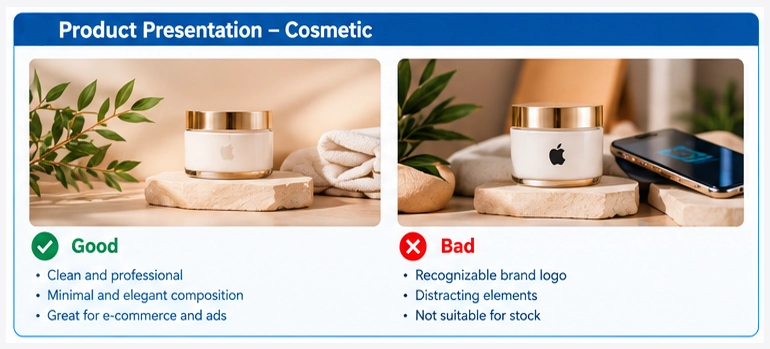
When creating stock content, avoid unnecessary recognizable brand logos and trademarked designs.
18. Avoid Copyrighted Characters
Do not build your stock portfolio around famous copyrighted characters or recognizable fictional properties.
Create:
Original futuristic superhero character standing in a modern city at night.
19. Avoid Extremely Similar Images
Uploading many nearly identical images is not a good portfolio strategy.
| Weak Approach | Better Approach |
|---|---|
| Same person, same pose | Different concepts and compositions |
| Only tiny color changes | Different environments |
| Same camera angle | Different camera perspectives |
| Hundreds of near duplicates | Smaller collection of useful variations |
20. Create Images Around Buyer Needs
Instead of asking:
Ask:
Example 1: Cybersecurity
Buyer need: A technology website needs a cybersecurity image.
Your solution: Create a professional cybersecurity concept with clean composition.
Example 2: Mother’s Day
Buyer need: A marketing agency needs a Mother’s Day banner.
Your solution: Create a Mother’s Day composition with generous copy space.
Example 3: E-commerce
Buyer need: A beauty company needs a product presentation background.
Your solution: Create a premium generic cosmetic presentation scene.
21. AI Prompt Formula for Stock Images
A useful prompt structure is:
22. Example AI Stock Prompts
Business
Cybersecurity
Healthcare
E-commerce
Ramadan
23. Metadata: Title and Keywords Matter
Creating the image is only one part of the stock workflow. Your metadata should accurately describe what the buyer can see.
| Weak Title | Better Title |
|---|---|
| Amazing AI Business Image | Professional Business Team Discussing Digital Marketing Strategy in Modern Office |
Example Keywords
24. Technical Quality Checklist
- ✓ Correct resolution
- ✓ Sharp details
- ✓ No excessive noise
- ✓ No compression damage
- ✓ Natural colors
- ✓ Correct anatomy
- ✓ Realistic objects
- ✓ Clean background
- ✓ No broken text
- ✓ No unnecessary logos
- ✓ Professional composition
25. Upscaling AI Images
If your AI generator produces a smaller image, you may need an upscaling workflow.
However, increasing resolution does not automatically make an image better.
After upscaling, inspect:
- Face details
- Hair
- Skin
- Textures
- Hands
- Edges
- Small objects
26. Complete Adobe Stock AI Workflow
- Research: Find commercially useful concepts.
- Choose a niche: Select business, technology, healthcare, lifestyle, seasonal or another category.
- Create prompts: Write specific prompts designed around buyer needs.
- Generate: Create multiple candidates.
- Select: Keep only the strongest images.
- Quality control: Inspect the image at high zoom.
- Edit: Fix obvious problems when necessary.
- Upscale: Increase resolution when appropriate.
- Final inspection: Check the final file again.
- Metadata: Create an accurate title and relevant keywords.
- AI declaration: Follow Adobe Stock’s current requirements for generative AI content.
- Submit: Upload the final image.
27. AI Stock Image Categories to Test
| Category | Example Concepts |
|---|---|
| Business | Meetings, leadership, teamwork, startups |
| Technology | AI, cloud, software, cybersecurity |
| Healthcare | Doctors, telemedicine, wellness |
| Finance | Banking, investment, financial planning |
| E-commerce | Shopping, product presentation, online business |
| Education | Students, online learning, classrooms |
| Lifestyle | Family, travel, fitness, home |
| Seasonal | Christmas, Eid, Ramadan, Valentine’s Day |
| Backgrounds | Minimal, abstract, advertising backgrounds |
| Cultural | Regional lifestyle, food, traditions |
28. Build a Portfolio, Not Just Individual Images
Instead of creating one image around a topic, build a complete collection.
Example: Business Collection
- Business team meeting
- Remote work
- Digital marketing
- Business presentation
- Financial planning
- Startup team
- Leadership
- Customer service
- Business analytics
- AI business strategy
29. Track Your Results
After publishing your images, monitor your own portfolio performance.
- Downloads
- Popular concepts
- Popular categories
- Seasonal performance
- Image orientation
- Subject matter
- Customer demand
30. Approval and Sales Are Different
| Goal | Focus On |
|---|---|
| Getting Approved | Technical quality, originality, requirements and accurate metadata |
| Getting Downloads | Buyer demand, commercial usefulness, composition and timing |
31. The Golden Rule for AI Stock Contributors
Before uploading any AI image, ask yourself:
- Is this image technically clean?
- Is it commercially useful?
- Can a designer or marketer actually use it?
- Is the concept original enough?
- Would I download this image if I were the buyer?
32. Final Adobe Stock AI Submission Checklist
☑ Commercial concept
☑ High resolution
☑ Sharp details
☑ No obvious AI artifacts
☑ Correct anatomy
☑ Correct hands
☑ Correct face
☑ No broken text
☑ No unnecessary logos
☑ No copyrighted characters
☑ Useful composition
☑ Copy space when appropriate
☑ Accurate title
☑ Relevant keywords
☑ Correct AI-content declaration/category
☑ Final quality inspection
Conclusion
Adobe Stock AI content is not simply about generating as many images as possible.
Research → Create → Inspect → Improve → Optimize → Submit → Analyze
Focus on images that solve real visual problems for buyers.
Business, technology, healthcare, lifestyle, seasonal content, cultural concepts, advertising backgrounds and other commercially useful categories can all be tested.
However, there is no guaranteed best-selling AI image category. Buyer demand and marketplace trends change over time.
The best long-term strategy is to build a diverse, high-quality portfolio, monitor your own results, and continuously improve your content.
Think Like a Stock Contributor — Not Just an AI Image Generator
Create images that buyers can actually use.
🎥 Watch the Video Tutorial
Want to see the complete process step-by-step? Watch our YouTube tutorial where we demonstrate AI image research, prompt creation, image generation, quality checking, upscaling, metadata preparation and Adobe Stock submission.
Subscribe to our channel for more Adobe Stock, AI image generation and stock contributor tutorials.